You paste a URL into a chat, and half of it looks like gibberish — %20, %3F, +, weird capital letters where spaces should be. It looks broken. looks like a spelling mistake. It almost never is.
A URL encoder spell mistake is the common confusion where percent-encoded characters in a web address get mistaken for typos, or where a real encoding error makes a working URL look “spelled wrong.” Most of the time, those % codes are doing exactly what they should. The rest of the time, a small fix turns a broken link into a working one.
This guide walks through what URL encoding actually does, the seven mistakes that trip up beginners and pros alike, and a five-step process to fix any encoded URL that refuses to work. By the end, you will be able to read an encoded URL like plain text and repair the bad ones in under a minute.
What URL encoding is and why it looks like a spelling mistake
URL encoding (also called percent-encoding) is the standard way of representing characters in a web address that browsers, servers, and APIs cannot read safely as-is. The rule comes from RFC 3986, the official spec that defines URLs on the modern web.
The reason a clean URL turns into something that looks like a spell mistake is simple. Web addresses can only safely carry a small set of characters: letters, digits, and a few symbols like -, _, ., and ~. Everything else — spaces, accents, emoji, question marks inside parameters, ampersands inside search terms — gets converted into a percent sign followed by two hex digits.
How URL encoding works in plain English
Every character on your keyboard has a number behind it. The letter A is 65. A space is 32. The euro sign € is a multi-byte UTF-8 sequence. URL encoding takes that number, converts it to hexadecimal (base 16), and writes it after a % sign.
A space becomes %20. A question mark becomes %3F. The forward slash becomes %2F. So this URL:
https://example.com/search?q=hello worldbecomes:
https://example.com/search?q=hello%20worldThe browser still reads it as “hello world.” Nothing is misspelled. The %20 is the encoded form of the space.
The percent-encoding pattern explained
Every percent-encoded character follows the same pattern: % plus two characters from 0-9 or A-F. That is it. If you see a % followed by anything else, that is a real mistake — and a clue that an encoder somewhere made an error.
Mozilla’s MDN Web Docs confirms this rule and lists which characters must be encoded in which parts of a URL (path, query string, fragment). The rules differ slightly by section, which is the source of most encoding bugs.
Seven common URL encoder spell mistakes to fix
Most encoding problems fall into one of seven categories. Once you can name the mistake, the fix takes seconds.
1. Space confusion: + versus %20
A space in a URL path must be encoded as %20. A space inside a query string (after the ?) can be encoded as either %20 or +. Beginners often mix them up.
The mistake usually looks like this:
https://example.com/blog post → broken (raw space)
https://example.com/blog+post  → broken (+ not allowed in path)
https://example.com/blog%20post → correct
For query strings, both ?q=hello+world and ?q=hello%20world work. Inside the path, only %20 is safe.
2. Double-encoded characters
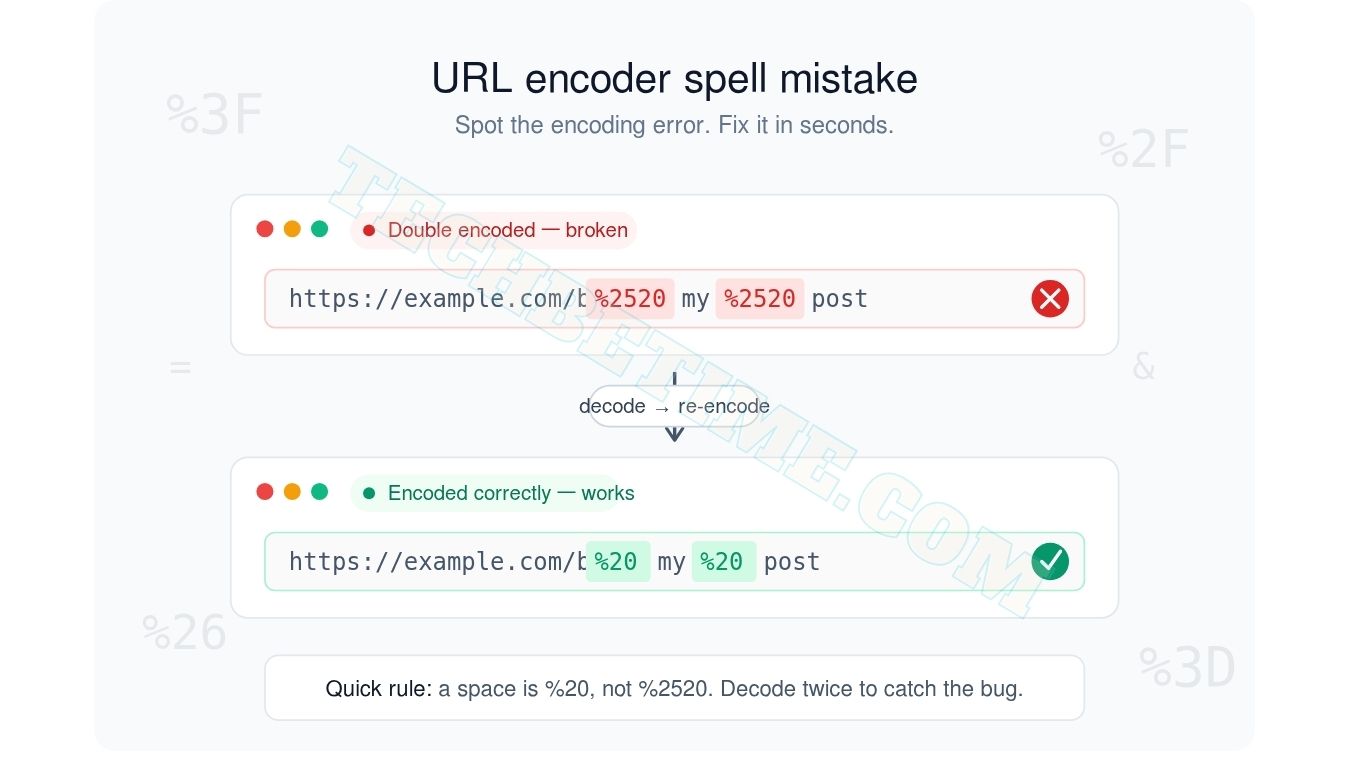
This is the most common URL encoder spell mistake by far. A character gets encoded once, then a second tool or script encodes it again. The % itself becomes %25, so %20 (space) turns into %2520.
You will see this in tracking links, redirect chains, and form submissions that pass through multiple systems. The URL looks like a long string of garbage. The fix is to decode the URL once, check if it still looks encoded, and decode again until you reach clean text.
3. Missing percent symbols
Sometimes only the hex digits show up — 20hello instead of %20hello. This usually happens when a script strips special characters thinking they are unsafe. The result looks like a typo: an extra 20 floating in the middle of a word.
If you see suspicious two-character sequences (20, 2F, 3F, 26) right next to readable text, a missing % is the likely culprit.
4. Encoding the wrong characters
Letters, digits, and the safe symbols -, _, ., ~ should never be encoded. When an over-eager encoder converts the letter a to %61, the URL still works, but it is bloated and harder to debug.
Worse, some characters must NOT be encoded in certain positions. The ? between the path and query string is a structural marker. Encode it as %3F and the server will read your query parameters as part of the path. The page breaks.
5. Mixed-case hex codes
%2F and %2f represent the same character (a forward slash). RFC 3986 section 6.2.2.1 says they are equivalent, but it recommends uppercase. Some older systems and SEO tools treat %2F and %2f as different URLs and create duplicate content issues.
If your analytics shows two versions of the same page racking up half the traffic each, mixed-case encoding is worth checking.
6. Reserved character mishandling
Reserved characters carry meaning in a URL: ?, #, &, =, /, :. If you want a literal & inside a search term, you must encode it as %26. Otherwise the server reads it as the boundary between two query parameters.
A real example: searching for “rock & roll” in a music site. The URL must be ?q=rock%20%26%20roll. Write it as ?q=rock & roll and the server thinks you sent two parameters: q=rock and roll= (empty).
7. Unicode and UTF-8 errors
Non-English characters — é, ñ, ü, 中, emoji — require multiple bytes when encoded. The accented é is %C3%A9 in UTF-8. The Chinese character 中 is %E4%B8%AD.
If your encoder uses the older Latin-1 or Windows-1252 standard instead of UTF-8, accented characters come out mangled. You will see things like caf%E9 instead of caf%C3%A9, and the page either 404s or displays nonsense.
Here is a quick reference table of the most common encoded characters and what they mean:
| You see this | It means | Where it appears |
|---|---|---|
%20 | space | anywhere |
+ | space | query string only |
%3F | ? | inside a parameter value |
%26 | & | inside a parameter value |
%2F | / | inside a parameter value |
%3D | = | inside a parameter value |
%23 | # | inside a parameter value |
%25 | % | the % character itself |
%C3%A9 | é (UTF-8) | path or query |
%E2%82%AC | € (UTF-8) | path or query |
Save this table. It covers about 95% of the encoding you will ever need to read by hand.
How to fix a URL encoder spell mistake in five steps
Most encoded URLs look intimidating but break in predictable ways. Run through these five steps in order and you will catch nearly every error.
Step 1: Identify the broken segment
Copy the URL into a plain text editor. Look for the part that does not match the pattern. Real percent-encoded characters always follow the format % + two hex digits (0-9 or A-F). Anything else is suspect.
Common red flags include a lone % with no hex digits after it, a sequence of three or more % codes in a row that should be a normal word, or random uppercase letters mid-word (hello%20WORLD is fine; helLo%20worLd is suspicious).
Step 2: Decode the URL
Run the URL through a decoder. Any online URL decoder works, or you can use the browser console: decodeURIComponent("your%20url%20here").
If the decoded result still contains % codes, decode it again. A URL that needs decoding twice was double-encoded, which is mistake number two from the list above.
Step 3: Spot the actual mistake
With a clean decoded URL in front of you, read it like a sentence. Does the structure make sense? Is the ? in the right place? Are the & separators between parameters? Are there spaces where letters should be?
Most real spell mistakes hide here. The encoder did its job. The original URL had the typo.
Step 4: Re-encode using the right tool
Use a trusted encoder that follows RFC 3986 and uses UTF-8 by default. Browser tools like encodeURIComponent() in JavaScript handle this correctly. So do online encoders from reputable sources like W3Schools and the W3C URL Living Standard.
Encode each part of the URL separately if needed. The path follows one set of rules, the query string follows another. Encoding the whole URL as a single string is a frequent source of bugs.
Step 5: Test in a real browser
Paste the corrected URL into a private or incognito browser window. Watch the address bar. Modern browsers automatically decode safe characters back to readable form, so a working URL often looks “cleaner” in the address bar than what you pasted.
If the page loads, the encoding is correct. If it 404s, check that the path on the server actually exists with the characters you encoded. Sometimes the URL is encoded perfectly and the file simply is not there.
When URL encoding mistakes cause real problems
A wrong percent code is not just an eyesore. It can break critical systems. Here are the two places where URL encoder spell mistakes hurt the most.
SEO and search engine crawling
Google treats %2F and %2f as the same URL most of the time, but Google’s URL structure guidelines recommend consistent encoding to avoid crawl waste. If half your internal links use uppercase hex and half use lowercase, Googlebot may crawl both versions, splitting your link signals.
Worse, double-encoded URLs in your sitemap point to pages that do not exist. The page is /blog/my-post, but the sitemap lists /blog/my%2520post. Google tries the encoded version, gets a 404, and you lose the page from the index.
APIs, forms, and analytics
Form submissions that include special characters fail silently when encoding is wrong. A user types “rock & roll” in a search box. The frontend forgets to encode the &. The backend receives q=rock and ignores everything after, returning random results.
Analytics tools have the same problem. If your campaign tracking parameter is ?utm_campaign=summer%20sale in one place and ?utm_campaign=summer+sale in another, your reports split the data into two campaigns. The numbers look smaller. The decisions you make from them are wrong.
URL encoder spell mistake: frequently asked questions
What is the most common URL encoder spell mistake?
Double encoding is the most common URL encoder spell mistake, where a character gets percent-encoded twice. A space, normally encoded as %20, becomes %2520 because the % itself gets encoded a second time. The fix is to decode the URL twice and re-encode it only once using a UTF-8 compliant encoder.
This happens most often in redirect chains, in forms that re-encode their own output, and when developers manually concatenate already-encoded strings.
How do you decode a URL by hand?
Read each % followed by two hex digits as a single character. Convert the two hex digits to decimal, then look up the character in an ASCII or UTF-8 table.
For example, %20 is hex 20, which equals decimal 32, which is a space. %3F is hex 3F, decimal 63, the ? character. For UTF-8 sequences with multiple bytes (like %C3%A9 for é), you need a UTF-8 decoder because the bytes combine to form one character.
In practice, almost no one decodes URLs by hand. The browser console function decodeURIComponent() does it instantly and correctly.
Why does my URL show %20 instead of a space?
%20 is the standard URL encoding for a space character. Browsers, servers, and APIs cannot transmit raw spaces in a URL, so spaces get converted to %20 whenever the URL is shared, copied, or sent through certain systems.
Most modern browsers display the decoded version (hello world) in the address bar but copy the encoded version (hello%20world) to your clipboard. This is intentional and correct. The URL works either way for the browser, but only the encoded version is safe to share in plain text.
Can an online URL encoder fix all these mistakes automatically?
A good URL encoder fixes most encoding mistakes automatically. It will encode special characters correctly, use UTF-8 for non-English text, and apply the right rules for path versus query string segments. Tools that follow the RFC 3986 standard catch the majority of common errors.
A URL encoder cannot fix real spelling mistakes in the underlying URL. If your link points to /blog/recieve-payments when the actual page is /blog/receive-payments, no encoder will save you. Decoding the URL first to read it as plain text is the only way to catch those errors.
Final thoughts
A URL encoder spell mistake is almost never what it looks like. Those %20 and %3F symbols are not typos — they are a standard system doing exactly what it should. The real mistakes are double encoding, mismatched character sets, and reserved characters left unencoded, and each one has a simple fix once you know what to look for.
Three things worth keeping in mind: percent-encoded characters always follow the % + two-hex-digit pattern, double encoding is the most common real bug, and UTF-8 is the only character set you should be using in 2026.
For more practical guides and free tools for everyday calculations, projects, and conversions, head over to ToolCalcPro. And if you have run into a URL encoding bug we did not cover, drop it in the comments — we read every one.